
Comfort Keys Lite7.5 - Download
You'll be able to download in few seconds.
Publisher Description
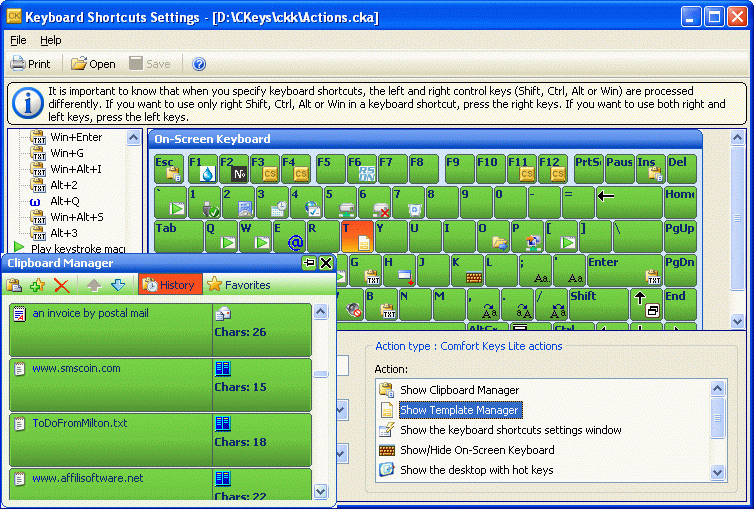
Discover how to perform any computer action in one click!
Stop typing the same text over and over again! Now you don't need to go through numerous menus to find the necessary program or web page. With this new generation hotkey manager you can leave your mouse alone and configure hotkeys for all of your actions - just like real pro's do.
Comfort Keys will allow you to:
+ Launch the necessary programs and open web pages by pressing a single hotkey.
+ Insert predefined texts (email templates, signatures, passwords, greetings, phone numbers, addresses, etc.) using hotkeys or the built-in template manager.
+ Change the language and case of the typed text.
+ Control the sound volume in a quick and convenient manner.
+ Record key press sequences and play them back as many times as you need.
+ Block some keys or simulate the press of a specific key when another one is pressed.
+ And much more.
We made sure you always have a hotkey guide at hand by integrating a fully functional on-screen keyboard showing all the available hotkeys.
About Comfort Keys Lite
This Automation Tools program is available in English, Arabic, Bulgarian, Byelorussian, ChineseSimplified, Croatian, Czech, Danish, Dutch, German, Greek, Hungarian, Italian, Latvian, Russian, Spanish, Swedish, Turkish. It was last updated on 29 September, 2026. Comfort Keys Lite is compatible with the following operating systems: Windows, Windows-mobile.
The company that develops Comfort Keys Lite is Comfort Software Group. The latest version released by its developer is 7.5.
The download we have available for Comfort Keys Lite has a file size of 6.3 MB. Just click the green Download button above to start the downloading process. The program is listed on our website since 2017-02-02 and was downloaded 0 times. We have already checked if the download link is safe, however for your own protection we recommend that you scan the downloaded software with your antivirus. Your antivirus may detect the Comfort Keys Lite as malware if the download link is broken.
How to install Comfort Keys Lite on your Windows device:
- Click on the Download button on our website. This will start the download from the website of the developer.
- Once the Comfort Keys Lite is downloaded click on it to start the setup process (assuming you are on a desktop computer).
- When the installation is finished you should be able to see and run the program.
Program Details
General
System requirements
Download information
Pricing
Version History
version 7.5
posted on 2017-02-02
Improved Windows 10 Compatibility.
Fixed issue with double letter entry when typing with the stylus or pen.
Fixed issue with computer restart.
Some other bugfixes and improvements.
version 3.5
posted on 2009-01-05
* Slightly enlarged buttons "Close" and "Auto Hide".
+ The number of results is displayed in the filter menu of the clipboard manager.
+ Added an ability to create groups for favorites of the clipboard manager.
etc.
Disclaimer
External Download
We do not host Comfort Keys Lite on our servers. We did not scan it for viruses, adware, spyware or other type of malware. This app is hosted by the software publisher and passed their terms and conditions to be listed there. We recommend caution when installing it.
The external download link for Comfort Keys Lite is provided to you by apps112.com without any warranties, representations or guarantees of any kind, so access it at your own risk.
If you have questions regarding this particular app contact the publisher directly. For questions about the functionalities of apps112.com contact us.
